BW SecureFile is a way to secure and send Personally Identifiable Information (PII) to someone safely without violating FERPA protections.
To use the BW SecureFile, visit securefile.bw.edu
- BW users: you may log in with your username and password and send files to anyone, in or out of the University.
- Non-BW users: you cannot log in, but can still send files to BW users if you know their email addresses. Start by clicking the "Drop-off" button.
BW users who wish someone outside the University to send them files can make it a lot easier for them by logging in and clicking "Request a Drop-off". That saves the other person from having to prove who they are. The request created will be valid for 7 days.
BW SecureFile is a service to make it easy for you to move files, including large files up to 20.0 GB, in and out of the University.
IMPORTANT: Files are automatically deleted from BW SecureFile 14 days after you upload them.
How secure is BW SecureFile?
- All files are transferred across the network securely encrypted.
- If you are sending personal or confidential data, tick "Encrypt every file" when creating a new drop-off. Then the passphrase you enter must be used when downloading the drop-off. The passphrase is not stored on BW SecureFile, and cannot be recovered if lost. No one can access the files without it.
- All files uploaded and temporarily stored on BW SecureFile are held on equipment owned and operated at the University's own Data Center.
- All data is subject to the Data Protection regulations and laws of the University and the country.
- BW SecureFile is in no way a "cloud" service. Everything is stored (even temporarily) on equipment directly owned by the University, and managed by its own IT staff.
- All-access to data is very tightly and strictly controlled by the University. All accesses to data on BW SecureFile are logged and can be easily checked if you are ever concerned that a 3rd party might have gained access to your data.
- Visit https://securefile.bw.edu
- Enter your BW Username in the BW Username field
- Enter your BW Password in the Password field
- Click Login
- Click Drop-off to add your file to send securely
- Type the name of the person you wish to send the secure file to in the Name field
- Type the email address of the person you wish to send the secure file to in the Email field
- Click Add & Close
NOTE: Clicking Add will add the recipient to your address book and reset to all of you to add another recipient.
NOTE: Click Add Many to send the secure file to multiple recipients. Type one recipient per line, for example:
Stephen Coyne scoyne@bw.edu
BW Helpdesk helpdesk@bw.edu
- Once you have your recipient(s) added in the To field, type a short note to the recipient letting them the contents of your email.
NOTE: There are several security options available to add to your secure file.
- Click the Click to Add Files or Drag Them Here button
- A Windows dialog window will open, locate the file(s) you want to send securely, and click Open
- Type a description of the file you are sending in the Description field
- Click Drop-off Files
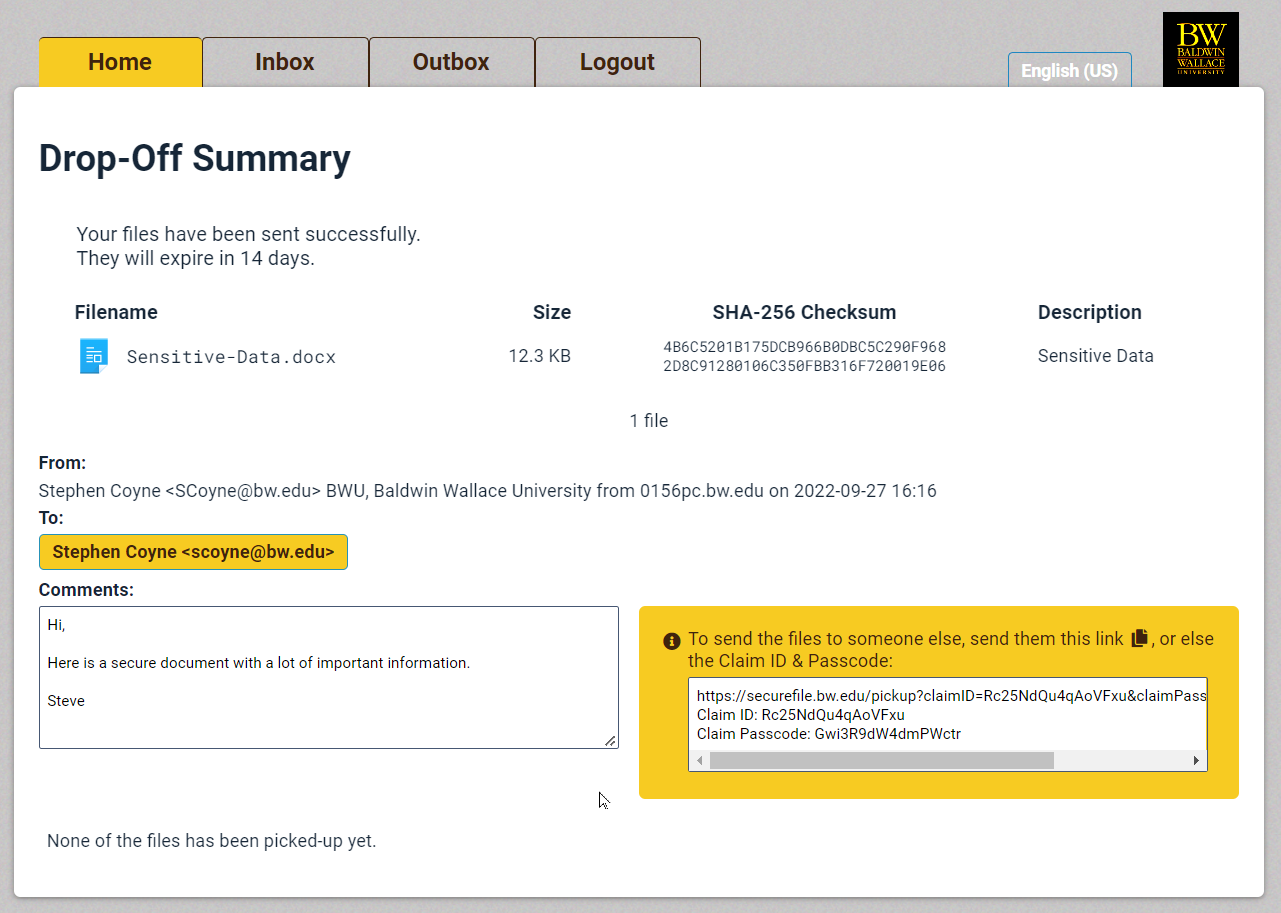
A Drop-off Summary window will open providing you with a receipt of the file you sent. You can close your browser tab.
Recipient Email
The recipient will receive an email with a link directing them to the BW Secure File website.
Clicking the link will bring the recipient to the BW Secure File website where they can download the file.
Uploaded data is only held on BW SecureFile for a maximum of 14 days, after which time it is automatically deleted. There is no "undelete" facility available at all. No backups are taken of the uploaded data (it's only a transitory stopping point), so no uploaded data ever moves off BW SecureFile itself onto other equipment or media such as backup tapes. After an uploaded file has been deleted, there is no way of recovering the file.